


Chefkoch - Rezepte & Kochen
4.750.00 Reviews
App Specs
- Version
- 7.3.0
- Updated On
- License
- Free
- Downloads
- 10,000,000+
- Developer
- Chefkoch GmbH
- Categories
- Food & Drink
- Platform
- Android, iOS
Screenshots




 Analysis by AppCompare
When I first open a recipe app, I want it to solve a very ordinary problem: deciding what to cook before I’m already hungry. Chefkoch - Rezepte & Kochen is built around that moment, with a huge range of dishes to browse and practical tools for carrying a recipe from idea to dinner. Its first-week appeal is easy to understand: there is always something new to look at. The harder test is whether it becomes part of a routine rather than another app I forget about, and for me that depends on how deliberately I use it.
Your Personal Kitchen Assistant
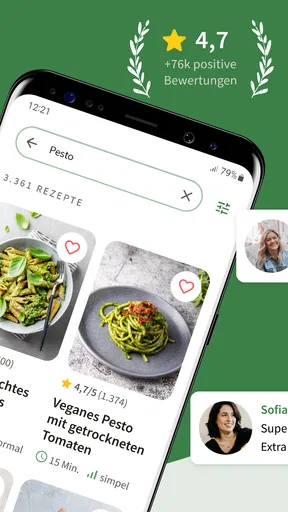
Right off the bat, the app greets you with an inviting interface that screams "Let's get cooking!" It’s super user-friendly, and regardless of your tech-savviness, navigating through its features is a breeze. You’ll find everything from quick weekday meals to elaborate dinner party showstoppers.
The first thing I noticed was the extensive range of recipes. Whether you’re a vegan, a meat lover, or somewhere in between, there’s a recipe here with your name on it. I mean, Chefkoch really nails it with the diversity. Plus, the app regularly updates with seasonal recipes, so you're always in sync with what's fresh and in season.
As a food and drink app from Chefkoch GmbH, it suits people who want recipe inspiration and a way to organize the path to a meal in one place. The store summary points to a weekly meal planner and a collection of 370,000 recipes, including low-carb and vegetarian options. I’d treat that breadth as a starting point, not a promise that every result will match my taste: a large library is most useful when I search with a clear ingredient, dietary preference, or kind of meal in mind.
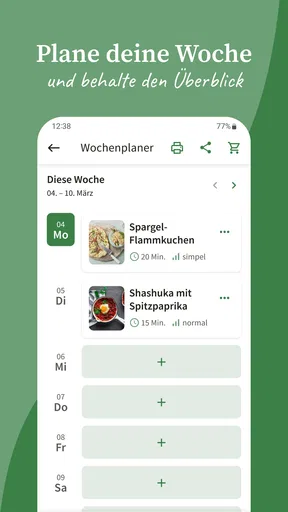
That distinction matters if you’re trying to build a weekly habit. Instead of browsing endlessly, I’d pick a few realistic dinners, save the ones I genuinely want to cook, and use the planner to give those ideas a place in the week. It turns browsing into a small decision-making routine: choose meals, check what each requires, and shop with a purpose. If I leave the app open-ended, the same abundance that feels exciting at first can become a reason to keep scrolling without choosing.
Features That Stand Out
What truly sets this app apart are the little touches that make cooking less of a chore and more of a joy. The shopping list feature? Absolute game changer. It lets you add ingredients from any recipe directly to your list, and even categorizes them. No more frantic aisle hopping at the grocery store!
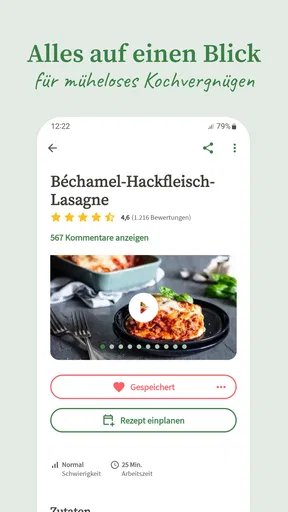
And if you’re like me, who sometimes needs a bit of hand-holding in the kitchen, the step-by-step instructions are a lifesaver. The app breaks down even the most complex recipes into manageable steps, complete with photos and tips, so you never feel lost.
Worth Reading Before You Choose

Switching to Android Auto Means Rethinking Your Driving Routine

Google Calendar Makes a Crowded Week Easier to Manage

Baby Panda World Brings Quick Play to Modern Phones, but Its Game Library Feels Busy

ESPN’s Live Game View Makes Following Close Games Easier

QuizzLand Review: A Good Fit for Short Trivia Breaks, Not Every Player

Basketball Stars: Multiplayer Is Fast, but Can It Recover When Matches Go Wrong?
A useful way to test a recipe before committing is to read its comments and ratings first, then compare the ingredient list with what you already have at home. That little pause can prevent a familiar disappointment: saving a tempting dish, only to discover at cooking time that it needs a special ingredient or more preparation than the evening allows. For a weeknight, I’d favor a recipe whose steps and shopping needs are clear; I’d save ambitious projects for a day when timing is flexible.
The planner and shopping list work best as a connected workflow rather than separate conveniences. I’d choose meals for several days, add their ingredients, then review the combined list before heading to the shop. That final check is worth doing because recipes can call for overlapping basics, and a list is only helpful if it reflects what is already in the cupboard. It also gives me a chance to swap out a dish if the week suddenly looks busier than expected.
Here’s a realistic use case: after work, I have little energy for deciding between another takeaway and cooking. I can look at a saved recipe, confirm that its steps feel manageable, and check the list for any missing ingredients. If I planned earlier, I’ve already done the hardest part—making the decision. For households sharing meals, the same approach can help everyone see what is intended for dinner, though it still takes a person to choose dishes and keep the plan current.
Community Vibes
Another cool aspect is the vibrant community within the app. You can read through comments and ratings from fellow users who’ve tried the recipes. It’s like having a bunch of food-loving friends on standby, ready to give you feedback or suggestions. Plus, you can even add your own tweaks and share your cooking adventures!
There’s a practical judgment call in how much weight I give those comments. They can help me spot whether other cooks found a recipe tricky or changed an ingredient, but they don’t replace my own sense of what my household enjoys. I use them as context, especially when a recipe sounds unfamiliar, rather than treating community feedback as a guarantee that the dish will turn out exactly as pictured.
And if you’re cooking for someone with a strict allergy or medical dietary requirement, I would not rely on a recipe label or a comment alone. I’d inspect every ingredient and make substitutions only when I understand the consequences. This is an inspiration and planning tool, not a substitute for careful food-safety judgment.
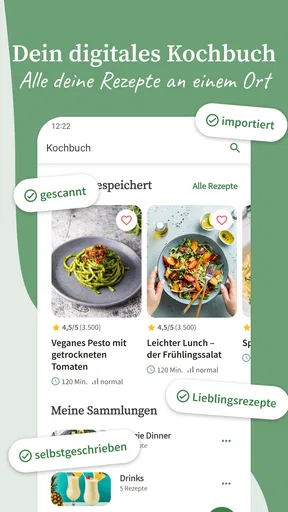
There's also a handy feature where you can save your favorite recipes. So, if you ever stumble upon a dish that tickles your taste buds, you can easily bookmark it for later. Trust me, this comes in handy more often than you’d think.
Saving recipes can become more useful over time if I treat it as a personal shortlist, not a second version of the entire library. I’d keep dependable meals that I have actually made, then use browsing for new ideas when I want variety. That separation makes it easier to return to a known dinner on a rushed night, while still leaving room to experiment on weekends. It also gives the app a recurring role beyond the novelty of discovering yet another recipe.
Keeping It Useful After the First Week
The app is free to download and is rated for Everyone, which makes it easy to try without turning the decision into a major commitment. It has a 4.7 average from around 110,000 ratings and more than 10 million installs. Those figures suggest that it has found a broad audience, but they can’t tell me whether its style, language, or recipe choices fit my own kitchen. I’d judge that by trying a few meals I would actually cook, not by browsing the most impressive-looking dishes.
There is also a version choice to keep in mind: the current version is 7.3.0, and the listed minimum operating system is 8.0. In-app purchases range from $0.99 to $44.99 per item, so I’d look carefully at any optional purchase screen and decide whether an extra is useful to me before paying. The free starting point is enough to see whether the core experience fits my habits; I wouldn’t buy anything simply because I had just installed it.
Compared with a printed cookbook, this app makes it easier to search broadly, read other cooks’ experiences, and move ingredients into a shopping list. Compared with a simple recipe website, its planner and saved recipes can make repeat use more organized. A paper notebook or a small collection of trusted recipes may still be better for someone who wants a quiet, fixed set of meals without ads or ongoing browsing. I’d choose the app for discovery and planning, and keep a personal note of the recipes that earn a permanent place in my rotation.
The main maintenance burden is not technical; it is attention. A meal plan needs to reflect what I will actually cook, saved recipes need a little curation, and shopping lists need a quick check against what is already at home. If I skip those small steps, the app can become another pile of intentions. If I keep the routine light—save only proven favorites and plan only as far ahead as I can realistically manage—it remains useful without demanding much effort.
What’s the Catch?
Of course, no app is perfect. While Chefkoch - Rezepte & Kochen offers a plethora of recipes and features, the ads can sometimes be a bit intrusive. But hey, that’s a small price to pay for an otherwise stellar free app.
That friction matters more to some cooks than others. If I’m following a recipe with messy hands or trying to keep dinner moving, interruptions are less welcome than they are during relaxed browsing. Someone who values a distraction-free screen above a large discovery library may prefer a cookbook or a simpler cooking reference. I can live with ads when I’m using the app to plan, but they are a real trade-off rather than something I’d pretend never affects the experience.
Language is another practical consideration. The app is primarily in German, which may make recipe names, ingredient details, and community comments harder to use if you do not read German comfortably. Its layout may still be easy to explore, but understanding a recipe is more important than navigating menus. Translation tools can help with unfamiliar wording, yet translating ingredients while shopping or cooking adds friction and can make precise substitutions harder. If English-language instructions are essential, I’d choose a resource designed around that need instead.
There is also a difference between inspiration and instruction. A wide selection can help me answer “What could I make?” but it cannot decide whether I have the time, equipment, or appetite for a particular dish. Before starting, I’d scan the full ingredient list and steps, not just the opening description. That simple check is especially valuable when cooking for guests or fitting dinner into a narrow window.
The Final Verdict
So, is it worth downloading? Absolutely. Whether you’re a seasoned chef or a kitchen newbie, Chefkoch - Rezepte & Kochen is a fantastic tool to have in your culinary arsenal. It’s like having a cookbook that’s constantly updating and evolving, tailored to your cooking needs and preferences.
I’d recommend it most to people who cook at home regularly, enjoy discovering dishes, and are willing to spend a little time turning ideas into a workable plan. It can also help newer cooks feel less alone when a recipe includes unfamiliar steps, while experienced home cooks may value the breadth and the community notes. I’d suggest skipping it if you need an English-first experience, want a completely ad-free cooking screen, or prefer a small, curated collection over a large searchable library.
In a world where apps are a dime a dozen, this one truly stands out for its functionality, community, and sheer breadth of recipes. So next time you’re pondering what to make for dinner, whip out this app and let your culinary journey begin. Happy cooking!
Pros
- Extensive recipe collection with diverse cuisines.
- User-friendly interface makes navigation seamless.
- Integrated shopping list for easy meal planning.
- Recipe sharing feature encourages community interaction.
- Offline access ensures usability without internet.
Cons
- Contains in-app ads that can be distracting.
- Limited customization for dietary preferences.
- Some recipes lack detailed cooking instructions.
- Occasional app crashes reported by users.
- Requires account for saving favorite recipes.
FAQs for Chefkoch - Rezepte & Kochen
What is Chefkoch - Rezepte & Kochen and what can I do with it?
Chefkoch - Rezepte & Kochen is a popular app that offers a vast collection of recipes, cooking tips, and meal planning tools. Users can explore thousands of recipes, save their favorites, and create shopping lists. The app also provides cooking tutorials and allows users to share their own recipes with the community.
Is Chefkoch - Rezepte & Kochen available for free, or does it require a subscription?
The app is free to download and use, offering access to a wide range of recipes and features. However, it also offers a premium subscription that unlocks additional features, such as ad-free browsing, exclusive recipes, and personalized meal plans. Users can choose to upgrade for a more enhanced experience.
Can I use Chefkoch - Rezepte & Kochen offline?
Yes, Chefkoch - Rezepte & Kochen allows users to save recipes for offline access. This feature is particularly useful for those who want to follow recipes without an internet connection, making it convenient for cooking in areas with limited connectivity or for planning meals on the go.
Are the recipes on Chefkoch - Rezepte & Kochen suitable for dietary restrictions?
Chefkoch provides a variety of recipes catering to different dietary needs, including vegetarian, vegan, gluten-free, and low-carb options. Users can filter recipes based on their dietary preferences and restrictions, ensuring they find suitable meal options for their lifestyle.
How user-friendly is the Chefkoch - Rezepte & Kochen app for beginners?
The app is designed to be user-friendly, with a clean interface and intuitive navigation. Beginners will find the step-by-step instructions and cooking tips helpful. The app also includes video tutorials for more complex recipes, making it easier for novice cooks to follow along and learn new techniques.


